If your website is accessible to users in the EU, your cookie banner could be non-compliant - even if you have an "Accept" button. EU law now requires that users are offered a real, equal choice: "I Accept" and "I Reject" ("I Decline").
This article explains what that means, and what your banner must include.
Our Free Cookie Consent lets you create and customize your Cookie Consent in less than two minutes. Just follow these 5 simple steps:
- To start click on Free Cookie Consent on our website:
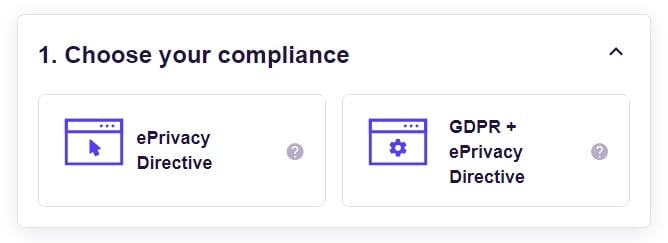
- First, choose your consent preference: GDPR + ePrivacy or just ePrivacy:
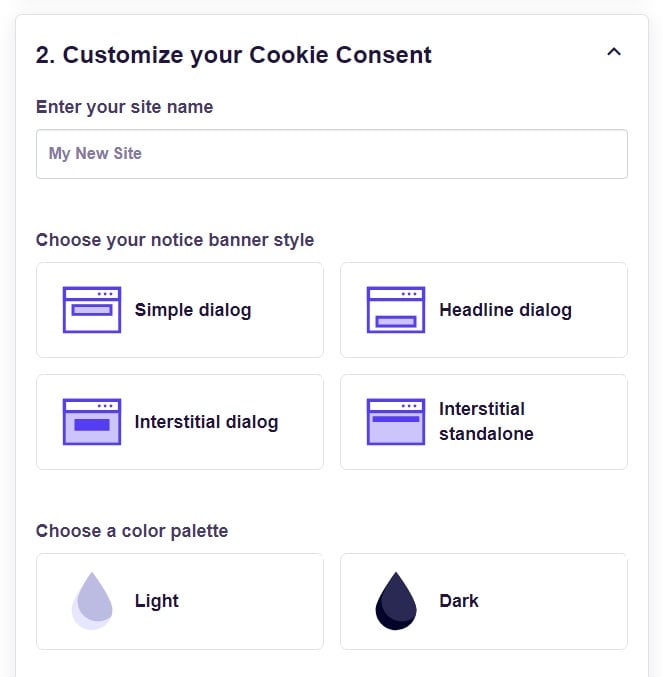
- On step 2 start with customizing your Cookie Consent banner with your website name, banner notice type and color palette:
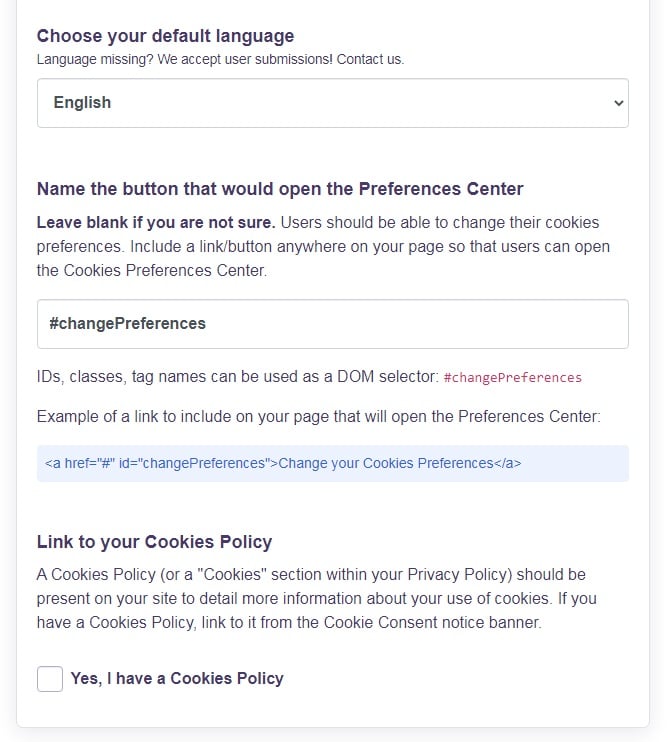
- Then choose your default language and other preferences:
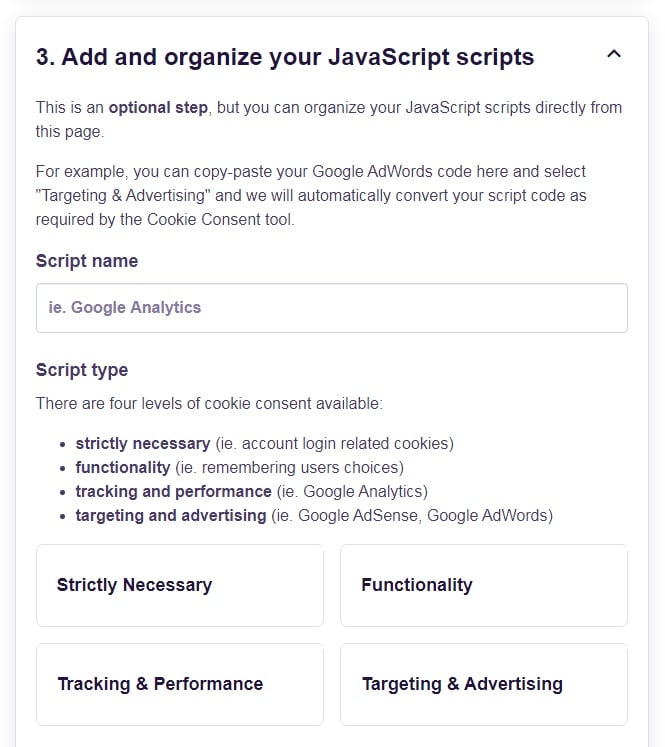
- You can group your JavaScript automatically using our builder page. Pass your JavaScript through here and we will include the necessary cookie consent level:
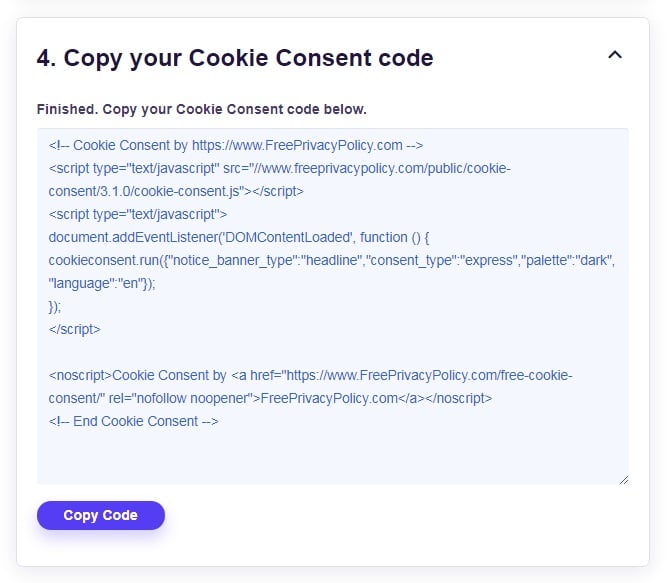
- Finished! Copy your Cookie Consent code and add it to one of your website pages before the closing of the
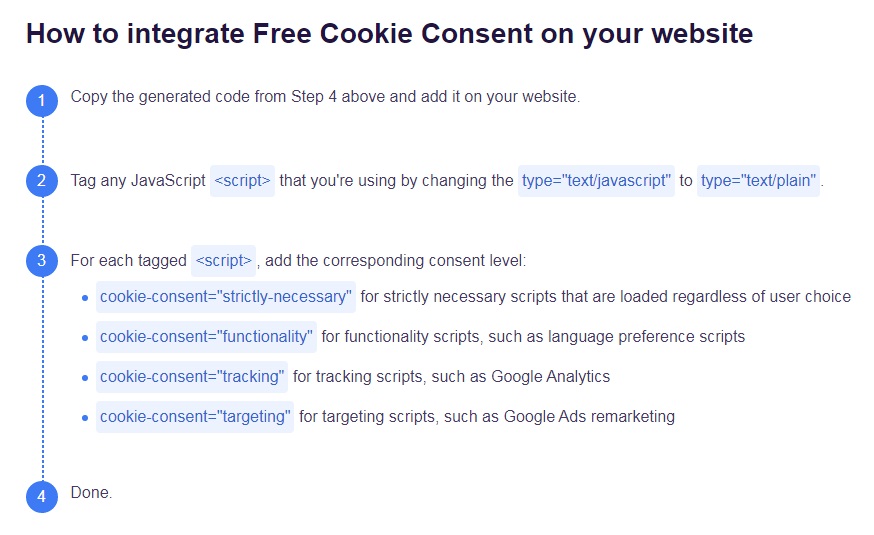
</body>tag: - If you need more help on How to integrate your Free Cookie Consent on your website, you can find more guidance here:
- 1. Which Laws Cover Cookie Consent Banners?
- 1.1. The ePrivacy Directive
- 1.2. GDPR
- 1.3. Rulings And Clarifications
- 2. What Happens If I Break The Rules With My Cookie Consent Notice Banner?
- 3. Do I Actually Need A Cookie Consent Notice Banner?
- 4. What To Include In A Cookie Consent Notice Banner
- 5. Consent Or Pay Models
- 6. Summary
Which Laws Cover Cookie Consent Banners?
Part of the confusion over what you must include in a cookie consent banner is that the banner is a way of satisfying two separate laws: the ePrivacy directive and the GDPR.
Let's break down the rules, then explore what that means for cookie banners, including "I decline" and "I reject" buttons.
The ePrivacy Directive
The ePrivacy Directive is officially titled the "Communications Directive 2002/58/EC" but is commonly referred to as the ePrivacy Directive. Sometimes people simply call it the "EU cookie law."
One of the key effects of the ePrivacy Directive is that you must get consent before issuing almost any type of cookie, whether they be first party (issued and used by you) or third party (for example, tracker cookies used by advertisers.)
The only exception is cookies classed as "strictly necessary", which are sometimes categorized as "essential". The key is that your website cannot function properly unless you use the cookie. Exactly what counts as strictly necessary will depend on the purpose of your site and the function it plays for the user.
For example, if you have an online store, a cookie that powers a virtual shopping cart will likely qualify as strictly necessary as it would be almost impossible for users to browse and buy multiple products without it. A cookie that lets you track the path somebody takes around your website would not be essential.
The ePrivacy Directive also says you must tell people the general purpose of the cookies (ie, the reason you use them) before asking for consent. This can be a summary rather than having to break down every cookie, but you should cover the different ways you use them.
Ecosia gives an overview of its cookie use:
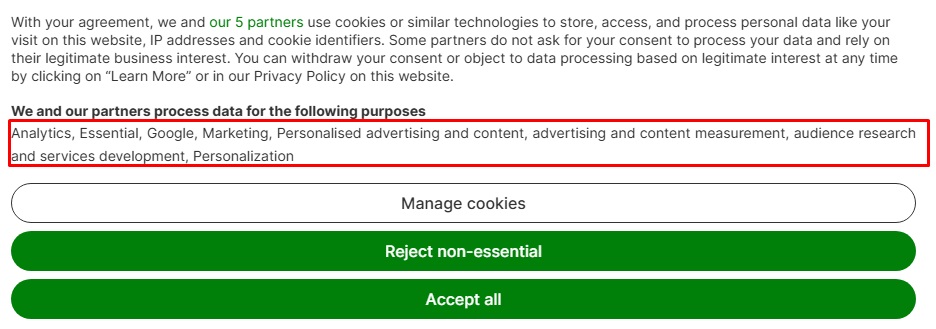
Finally, this consent must be based on clear information, meaning users have the opportunity to find out details of your cookie use. This could mean providing a link to more extensive detail such as a cookie policy.
GDPR
The General Data Protection Regulation (GDPR) covers personal data use. It doesn't specifically govern whether you issue cookies, but it can cover the information you collect by using cookies. This includes cases where the data from the cookie is anonymous but can be combined with other information to reveal personal data, such as somebody's online activities or purchases.
The key principle of the GDPR is that you can only process personal information when it comes under a lawful basis set out in the law. One such basis is legitimate interests, which means something that's part of your ordinary business activity and doesn't outweigh the person's privacy rights.
As a rough rule of thumb, most use of essential cookies would come under legitimate interests, but most use of non-essential cookies (if they can lead to processing personal information) would not.
The other most common lawful basis is consent. Technically with cookies, this means the user is consenting to your collection and use of data through cookies. In practice this has the same effect as consenting to the issuing of the cookie in the first place. Consent must always cover a specific purpose (i.e. using personal information for a particular reason), so consent relating to one type of cookie won't automatically count as consent for processing data from all cookies.
Rulings And Clarifications
Since the ePrivacy Directive and GDPR took effect, the way the rules work has been clarified and evolved in several ways. This includes guidance from the EU, rulings by courts and regulators, and the different ways in which individual EU countries incorporated the ePrivacy directive into their national laws.
These clarifications mean the ePrivacy Directive and GDPR rules on cookie banners have effectively changed. Some of the key clarifications include:
- Consent must be active, meaning the user takes an affirmative action. You cannot use opt-out consent where you assume the user consents unless they say otherwise. (This is why cookie banners are clearly necessary: you need consent before issuing non-essential cookies when somebody visits your site.)
- You can't use a cookie wall to block access to the site if the user doesn't accept non-essential cookies. (Doing so means the consent would not be based on a meaningful choice by the user.
- You cannot treat scrolling down a page or continuing to browse the website as a sign of consent.
- You cannot use a pre-ticked checkbox to show consent, or a toggle which has the "consent" option enabled by default.
- You can't promote one consent option more prominently than another or make one option easier and quicker.
What Happens If I Break The Rules With My Cookie Consent Notice Banner?
If your cookie consent notice banner breaks the rules, you could in turn break the key principles of the two laws: getting consent before issuing a cookie under the ePrivacy Directive or having a lawful basis (such as meaningful consent) under the GDPR.
The available punishments for breaking the ePrivacy Directive vary between countries and are set out in national laws. This can include substantial fines: France's data regulator (the CNIL) has issued fines running to millions and even tens of millions of Euros for breaches including using unclear information and making it more difficult to reject cookies than to accept them.
Breaking the GDPR can lead to penalties including being ordered to change your data processing practices; being temporarily or permanently banned from processing personal data; or being fined.
The GDPR has two categories of offenses and not having a lawful basis to process personal data falls into the more serious one, where the maximum fine is €20 million or four percent of your annual worldwide turnover, whichever is higher.
Do I Actually Need A Cookie Consent Notice Banner?
If you use any cookies other than strictly necessary ones, a cookie consent notice banner is a practical necessity. That's because:
- You must get consent before you issue the cookies.
- You must allow a meaningful choice about whether to consent.
- You can't block people from accessing the site if they don't consent to non-essential cookies.
- You can't simply let people continue to browse the site and assume they consent to cookies.
What To Include In A Cookie Consent Notice Banner
You can use three main approaches to meet the rules of both the ePrivacy directive and the GDPR in your cookie consent banner.
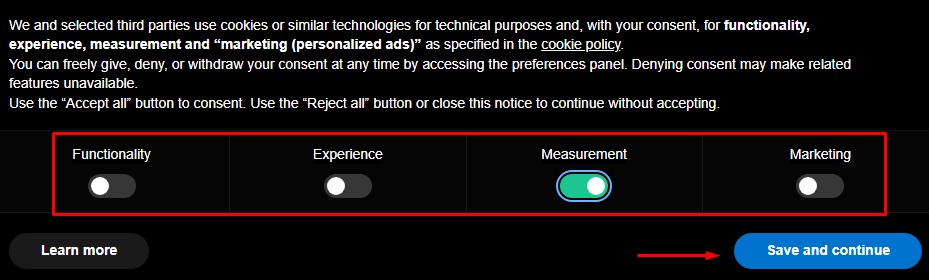
The first approach is to have a series of toggles or checkboxes that let people confirm what type of cookies they consent to (other than strictly necessary ones), along with a single confirmation button. This meets the rules because it lets users make a meaningful choice and then confirm it, with the process equally easy whichever option they choose. You can either have a single toggle/checkbox that covers all non-essential cookies or have a separate one for each type of cookie.
Linkbuilder lets users toggle consent for individual cookie types:
The second approach is to simply offer a choice of buttons, one to accept all non-essential cookies and one to reject or decline them. As long as these are clearly marked, this approach will also meet the rules.
Again, you let users make a meaningful choice and then confirm it, with the process equally easy whichever option they choose.
Do not be tempted to tweak this second approach in any way that favors one option over the other. For example, do not:
- Use direct, neutral or positive language for the "Accept" option but unnecessarily negative or unclear language for the "Reject" option.
- Only have a button for "Accept" and instead force people to click a link to another page to reject or decline consent.
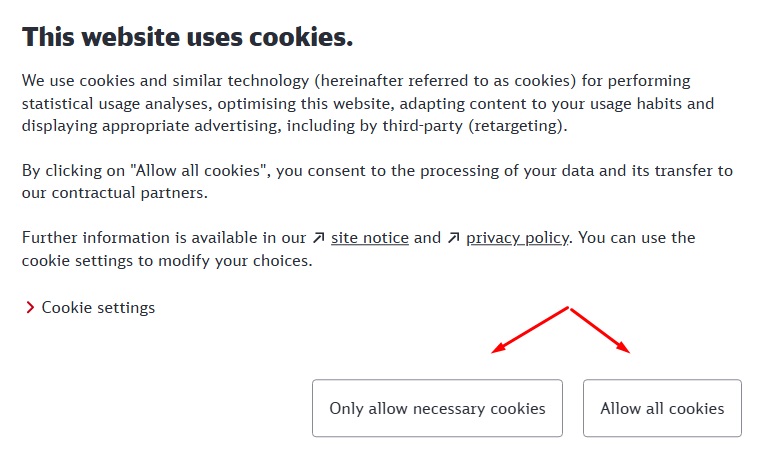
- Make one button more prominent, for example by making it bigger, using a different font or text size, or using different colors.
The Deutsche Bahn website uses two equally prominent buttons. Although it doesn't use the words 'decline' or 'reject', the wording is clear enough to allow a meaningful choice:
You can use a third approach that is a hybrid of the first two. In this one you offer buttons to either accept all non-essential cookies or reject all non-essential cookies.
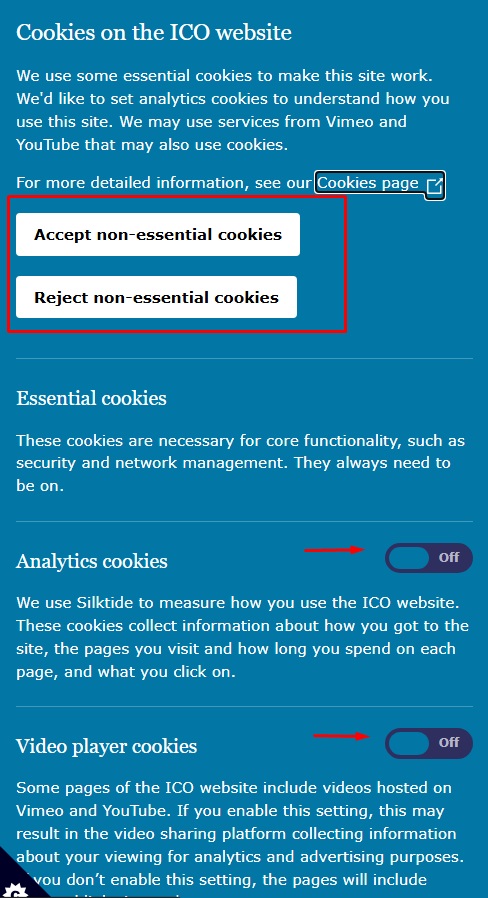
You then have a link to another screen or page that lets users give granular consent, e.g. consenting to security cookies but not consenting to advertising cookies. This page could also include more details about your cookie use or have a copy of your Cookies Policy and/or Privacy Policy.
The Information Commissioner's Office uses a hybrid approach, though all in one banner. Note that the setting toggles for individual types of cookie are set to 'off' by default:
The Real Madrid site uses the hybrid approach but makes the accept and reject options equally prominent:
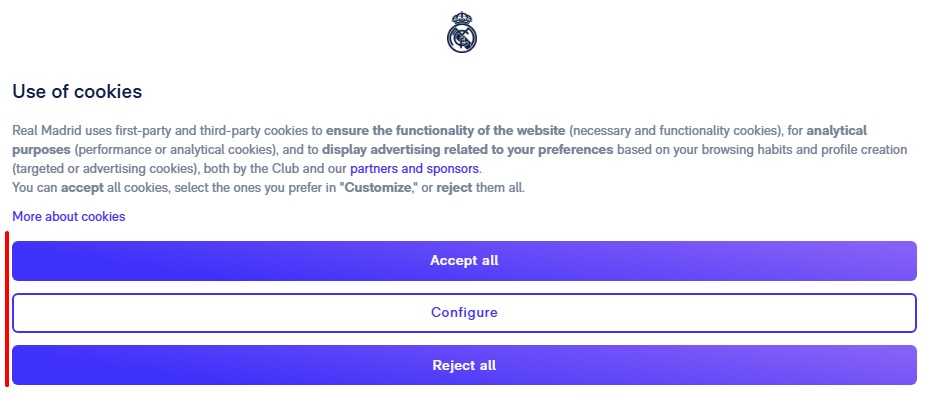
Remember that the rules only cover non-essential cookies. You do not need to have a button that literally says and means "Reject All" because you do not have to let people reject essential cookies.
Consent Or Pay Models
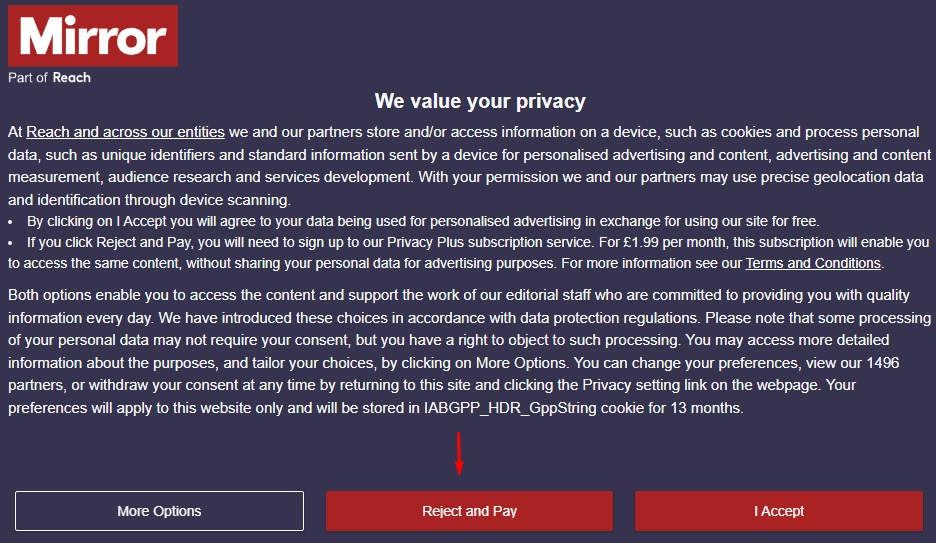
Some websites use an approach that gives users a choice between accepting non-essential cookies or paying a fee to use the site while rejecting the cookies.
The European Union had considered allowing such a measure in a proposed ePrivacy Regulation, which would replace the ePrivacy Directive. After years of debate, the EU formally abandoned work on the proposals in 2025. This means it's unclear if the "consent or pay" approach is compatible with the existing rules, including the GDPR. The biggest question is whether this leaves the user with a meaningful choice.
The United Kingdom, which mirrored the existing rules in its national laws when it left the European Union, has ruled the "consent or pay" model is legitimate. The fee cannot be unreasonably high, though regulators have not set a specific limit. These rules only affect UK sites when the visitor is from the UK.
This means that to be certain of complying with the rules, you should not use a "consent or pay" model unless you are based outside the EU, and you know the visitor is not in the EU.
The Mirror shows such a message to UK readers:
Summary
If your site uses a one-click "Accept All" cookie banner without a matching "Reject" option, it likely violates EU law. Consider using a Consent Management Platform (CMP) to stay compliant.
Two laws affect the way you issue cookies to users in Europe. The ePrivacy Directive requires consent to issue non-essential cookies. Meanwhile the GDPR requires consent to process personal data collected through cookies in many cases; in practice this means you'll need consent to issue and use non-essential cookies.
This consent must be active, unambiguous and based on a meaningful choice, with options to accept or reject non-essential cookies being equally prominent and easy to use. This means if you have an "Accept All" button in a cookie consent banner, you'll need a similar button that lets the user reject all non-essential cookies.
You must outline the way you use cookies in the cookie consent banner itself. You can ask the user to click through to another screen to find more details of your cookie use. You can also ask the user to click through to make a more specific choice about accepting some non-essential cookies and rejecting others. What you can't do is make it possible to accept cookies with a single click but make users complete additional steps to reject cookies.