Google wants users to make informed choices about whether to install an app from the Google Play store. Part of the information behind those choices is what data app developers collect and how they use it. The Data Safety section of app listings is a way for users to easily compare data use across different apps. Here's what you need to know and do to make sure your app meets the rules.
- 1. What is Google Play's Data Safety Section?
- 2. Do I Need To Complete Google Play's Data Safety Section for Every App?
- 3. What if I Don't Collect Any User Data?
- 4. Is the Data Safety Section the Same as A Privacy Policy?
- 5. What Information Must I Provide for the Data Safety Section?
- 5.1. Data Collection & Sharing
- 5.2. Types of Data
- 5.3. Purposes
- 5.4. Other Information
- 6. How Do I Complete the Data Safety Section?
- 7. What if My Data Use Varies Across Different Countries?
- 8. What About Data Use by Third Parties?
- 9. Do I Have To Tell the Truth in the Data Safety Section?
- 10. Do I Only Have To Complete the Data Safety Section Once?
- 11. Does Completing the Data Safety Section Mean I Don't Need To Do Anything Else?
- 12. Summary
What is Google Play's Data Safety Section?
The Data Safety section is a mandatory way for app developers to present specific information about their data use in an easily comparable way.
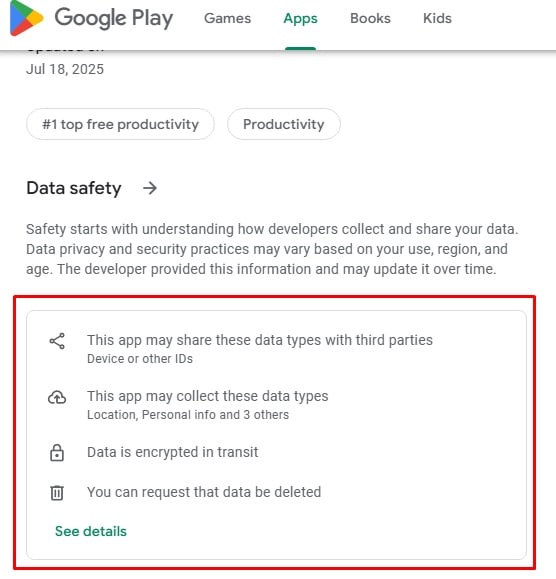
Developers provide the requested information through the "Data Safety form" and it then automatically appears in a standardized format as the "Data Safety section" within the app's listing in the Google Play Store.
Here's how ChatGPT's Data Safety section appears on its store listing:
Do I Need To Complete Google Play's Data Safety Section for Every App?
Yes, it is mandatory to complete the Data Safety form for any app distributed through the Google Play Store. When the rules were introduced, developers had a grace period to comply. This grace period ended in July 2022.
You must complete the Data Safety section for any app which a member of the public (outside of your business) can access. This includes apps which aren't yet available to all Play Store users but are in the closed, open or production testing tracks. The only exemption is for the internal testing track where only your staff can access the app.
The Data Safety section requirements don't cover Android apps which are only available through third-party app stores or through direct download and installation, eg. from your website.
As we'll cover later, data use by such apps may come under other Google rules and various laws that require disclosures.
What if I Don't Collect Any User Data?
You must still complete the Data Safety form for apps that don't collect data.
The idea of the Data Safety section is not to lay down rules about what you can and can't do with user data. Instead, it's a way to inform users about what you do and don't do, allowing them to decide whether to use the app.
Completing the Data Safety form will help highlight that you don't collect user data, which may make people more likely to install the app.
Is the Data Safety Section the Same as A Privacy Policy?
No. A Privacy Policy is usually a longer document in which you have more choice about what information you give and in what way (though some laws prescribe mandatory details to include.) The Data Safety section is a much simpler set of specific answers to specific questions, the idea being to have a standardized format for easy comparison.
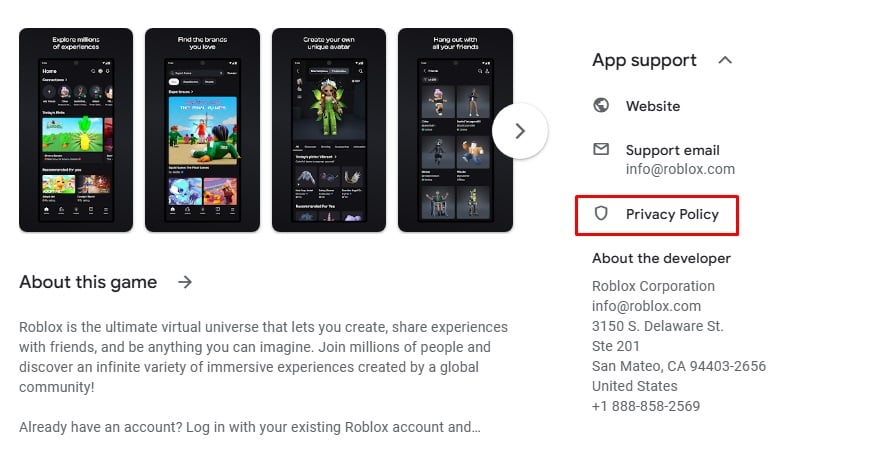
Note that if your app targets children, or if you collect sensitive data, you must have a Privacy Policy and link to it from your store listing. This isn't part of the Data Safety form process; instead you add the link elsewhere in the Play Console (the Google site for uploading apps.)
Here's the link to the Privacy Policy in the Google Play listing for child-targeted Roblox:
What Information Must I Provide for the Data Safety Section?
The information in the Data Safety section covers four main areas:
- Whether you collect or share user data.
- If so, what types of data you collect or share.
- For each type, the purposes for which you collect or share the data.
- Other, more general information about your data use and app.
Let's break these down:
Data Collection & Sharing
You first say if your app collects or shares any user data.
For the purposes of the Data Safety section, Google defines "collecting" as any situation where your app transmits data off the user's device. There is a special exemption for "ephemeral" processing where the data is only used momentarily and not retained: Google gives the example of a weather app sharing a user's location to retrieve a local forecast. You must still declare this data use in the Data Safety form, but Google will not include it in the Data Safety section.
Data sharing covers disclosures to third parties. It doesn't cover sending it to a third party that is processing it on your behalf. It also excludes data you must legally share (such as to meet a court order), anonymized data, and cases where the sharing is initiated by a user action and they knew this would mean the data would be shared.
Types of Data
If you collect or share any data, you must go through a list of data types and say whether you collect or share data of that type. In each case you can also say if the data collection is optional, meaning somebody can use the "primary functionality" of the app without providing the data.
The full list of data types is as follows.
Although they are grouped into categories, you must answer individually for each data type:
-
Category: Location
- Approximate location
- Precise location
-
Category: Personal info
- Name
- Email address
- User IDs
- Address
- Phone number
- Race and ethnicity
- Political or religious beliefs
- Sexual orientation
- Other info
-
Category: Financial info
- User payment info
- Purchase history
- Credit score
- Other financial info
-
Category: Health and fitness
- Health info
- Fitness info
-
Category: Messages
- Emails
- SMS or MMS
- Other in-app messages
-
Category: Photos and videos
- Photos
- Videos
-
Category: Audio files
- Voice or sound recordings
- Music files
- Other audio files
-
Category: Files and docs
- Files and docs
-
Category: Calendar
- Calendar events
-
Category: Contacts
- Contacts
-
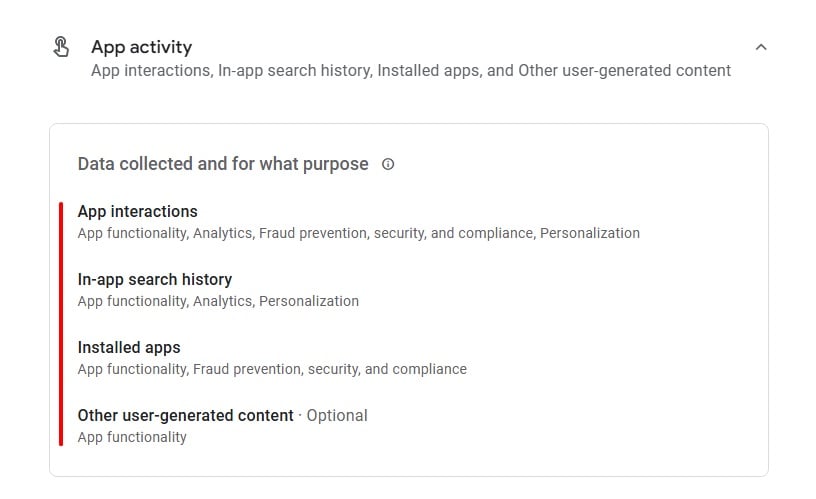
Category: App activity
- App interactions
- In-app search history
- Installed apps
- Other user-generated content
- Other actions
-
Category: Web browsing
- Web browsing history
-
Category: App info and performance
- Crash logs
- Diagnostics
- Other app performance data
-
Category: Device or other IDs
- Device or other IDs
Purposes
For each category where you collect or share data, you must say which of the following purposes you do or do not use the data for:
- App functionality
- Analytics
- Developer communications
- Advertising or marketing
- Fraud prevention, security and compliance
- Personalisation
- Account management
Here's how the TEMU Data Safety section shows specific types of data in the "App activity" category and the relevant purposes for each type:
Other Information
You will also need to answer questions about the following topics:
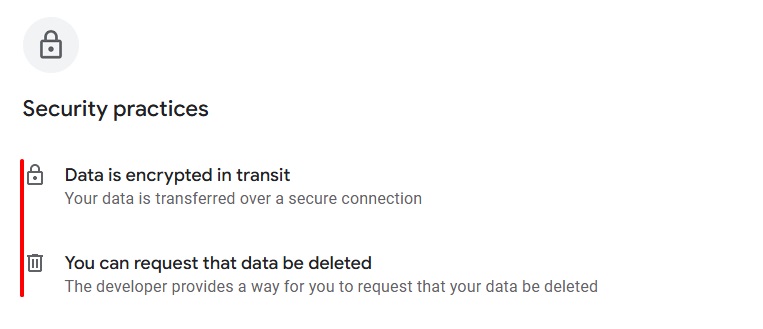
- Whether you encrypt data when it's transmitting between the user's device and your server.
- Whether users have a way to ask you to delete their data.
- Whether your app meets the Google Play families policies requirements. (Note that meeting the requirements is mandatory if children are among your target audiences.)
- Whether your app has passed an independent security review.
- Whether you use the Unified Payments Interface (a regulated money transfer system in India).
With the last three points, if you answer yes, a special badge will appear as part of your Data Safety section alongside the text answers. (The UPI badge only appears to users in India.)
Here's how WhatsApp's answers to these questions show up in its Data Safety section:
How Do I Complete the Data Safety Section?
After collating the necessary information, open the Play Console (the tool you use for uploading and managing apps for the Play Store), then go to the App Content page and look for the 'Data Safety' section.
You'll need to answer a Yes/No question for each type of data to say if you collect it. For each type you answer "Yes" to, you'll be asked some specific questions about your data use.
When you've finished you'll see a preview of how your Data Safety section will appear in your Play Store listing. If everything looks OK here you can submit the form. It should then show up in your listing within seven days.
What if My Data Use Varies Across Different Countries?
The Data Safety section doesn't have different sections or settings for different countries. Instead you'll need to answer the questions based on all your data use. This means for example that if you collect a particular type of data in even one country, you'll have to answer "Yes" when asked about collecting this data.
If you vary your data practices in different counties (for example, if you avoid collecting specific data in countries covered by the GDPR), Google recommends you instead mention this in the "About This App" section of your Play Store listing.
What About Data Use by Third Parties?
As a general principle, your Data Safety section answers must cover all data use from your app, including by and through third parties. For example, this could include data collected by the makers of software development toolkits, a third-party tool used to build apps.
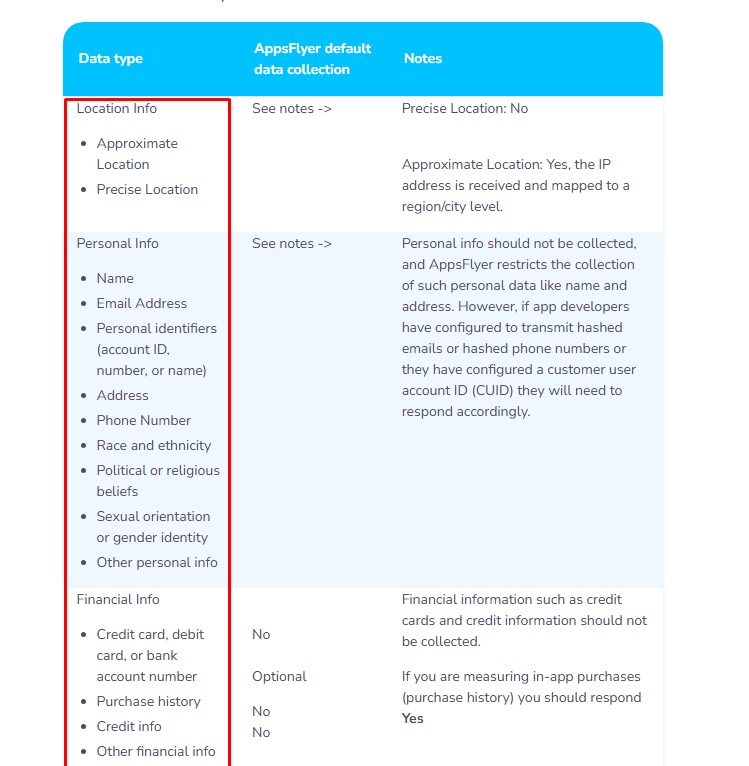
You are responsible for accurately reporting the data use. Many third-party providers who work with a lot of Android app developers have published details of their data use, specifically formatted to cover the individual categories in the Data Safety form questions.
Here's how AppsFlyer gives developer customers the relevant information to help complete their Data Safety form:
Do I Have To Tell the Truth in the Data Safety Section?
You are only allowed to publish an app in Google Play if you comply with the rule that your Data Safety section details accurately reflect your app's actual data collection and use.
Google does not proactively verify all Data Safety section details before publishing them in the Play Store listings. However, it does run spot checks and can receive complaints about inaccurate details.
If Google discovers your details are inaccurate, it can require that you fix this (either by changing the stated details or changing your data use to reflect the Data Safety section.) If you fail to do so, it has the right to block you from issuing updates to the app, or to remove your app from the Play Store.
Do I Only Have To Complete the Data Safety Section Once?
No, you must keep the Data Safety section up to date. This means changing it whenever you change your data use in a way that means the Data Safety section is no longer accurate and complete.
Does Completing the Data Safety Section Mean I Don't Need To Do Anything Else?
No, several rules and laws mean you may need to give further information about your data use in other ways.
Google's rules for Android say that if your app collects any data defined as "personal and sensitive" (such as financial or health information) you must prominently disclose this data use in the app itself, for example through an on-screen message. This rule applies to all Android apps, even those not distributed Google Play.
Many privacy laws around the world require you to disclose all your personal data use, including through apps. This includes Europe's GDPR, Canada's PIPEDA, Brazil's LGPD and Australia's Privacy Act. In some cases these laws apply if the user is in the relevant country, even if you (the app developer) are not. The US federal COPPA rule says you must detail your data use if your app is aimed at children or you know for certain they are using it.
Many US states have privacy laws, though these are often restricted to businesses handling data on a large scale. The precise rules vary, but often you'll need to disclose if you sell any data collected by your app. (This disclosure helps users meaningfully exercise their right to opt out of data sales.)
Summary
If you distribute an app through Google Play, you need to answer set questions about your data use through the Data Safety Form. This information then appears in your app listing in a standardized Data Safety Section that lets users easily compare apps and make informed decisions about using them.
Although completing the Data Safety Form is mandatory, it doesn't remove other obligations such as producing a Privacy Policy (for both Google rules and data protection laws) and having in-app notifications if you collect sensitive data.